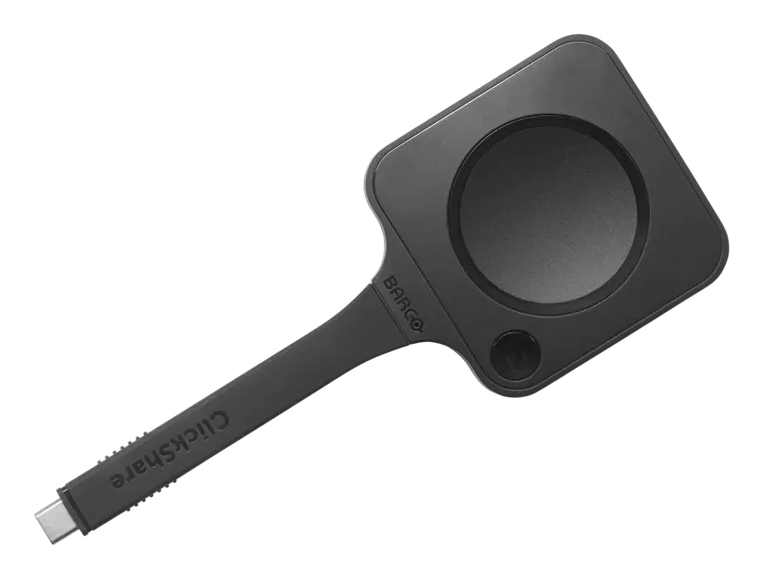
Barco Next-gen ClickShare Button for Wireless 4K Sharing
$450.00
Pay now, in 4 interest-free payments of $112.50, or over 3–6 months
4 interest-free payments of $112.50
Effortless wireless 4K content sharing with Wi-Fi 6E for faster, stable connections.USB-C DisplayPort™ for plug-and-play use with no drivers needed.Deliberate press to start sharing protects privacy.Compatible with Linux, Windows, MacOS, Chrome and s
8 in stock
↗
Estimated Delivery Time19 - 20 Nov 26
Seamless Wireless Collaboration
The Barco Next-gen ClickShare Button redefines ease in meetings by enabling instant wireless sharing of ultra-high-definition 4K content. Just plug it into your laptop's USB-C port and share presentations or join calls effortlessly, elevating every collaborative experience.
Advanced Connectivity and Control
Equipped with Wi-Fi 6E technology, this Button offers faster speeds, lower latency, and reduced interference for stable and reliable wireless connections. The USB-C DisplayPort™ support allows plug-and-play use without software installations. Additionally, a deliberate press mechanism prevents accidental sharing, maintaining privacy and control.
- Wi-Fi 6E (802.11ax) provides robust wireless performance
- Plug-and-play USB-C with DisplayPort support
- Deliberate press to start sharing safeguards privacy
Broad Compatibility and Security
Designed to seamlessly integrate into any meeting space, the Button supports all major operating systems, including Linux, Windows, MacOS, and Chrome. It fits well in high-security environments by supporting WPA3-SA encryption, ensuring secure and trustworthy connections.
This versatility allows effortless deployment across diverse IT environments and devices.
Part of the ClickShare Hub System
The Button is a key component of the ClickShare Hub wireless video conferencing suite, working harmoniously with Hub Core and Hub Pro systems. It provides one-click wireless 4K content sharing, speeding up meetings and enhancing visual impact.
Hub Core includes one Button for modular video conferencing, while Hub Pro supports dual displays with two Buttons for immersive collaboration.
Key Specifications
- Form factor: Desktop
- Color: Black
- Max resolution: 3840 x 2160 pixels at 30 fps
- Wi-Fi Standards: Wi-Fi 6E (802.11ax), plus legacy support
- Frequency Bands: 2.4, 5, 6 GHz
- Security: WPA3-SA
- Operating temperature: 0 – 40 °C
- Input interface: USB Type-C
- Power: 5 V, 0.6 A
What's in the box
- Barco Next-gen ClickShare Button USB-C device
Product FAQ
Frequently asked questions
01 What wireless standard does the Barco Next-gen ClickShare Button support?
It supports Wi-Fi 6E (802.11ax), providing faster speeds and lower latency for stable connections.
02 Is the ClickShare Button compatible with USB-C ports?
Yes, it supports USB-C DisplayPort™, enabling easy connection without software installation.
03 Can I use the Button with various operating systems?
Yes, it is compatible with Linux, Windows, MacOS, and Chrome operating systems.
04 What is the maximum supported video resolution?
The Button supports ultra-high-definition 4K content at up to 3840 x 2160 resolution.
05 Does the device require any software drivers?
No software or drivers are needed; it works plug-and-play via USB-C DisplayPort.
06 How does the Button prevent accidental sharing?
It requires a deliberate press to start sharing, protecting your privacy.
07 What is the operating temperature range of the Button?
The device operates between 0 and 40 °C temperature.
08 Is the ClickShare Button part of a larger system?
Yes, it integrates with ClickShare Hub Core and Hub Pro for wireless video conferencing.
09 What security features are included?
It supports WPA3-SA and works in high-security environments ensuring secure connections.
10 What are the physical dimensions of the device?
The device measures 63 mm wide, 161.3 mm deep, 16 mm high and weighs 88 g.
Discussion
0.0
Based on 0 reviews
No reviews yet. Be the first to share your experience.