
Very good
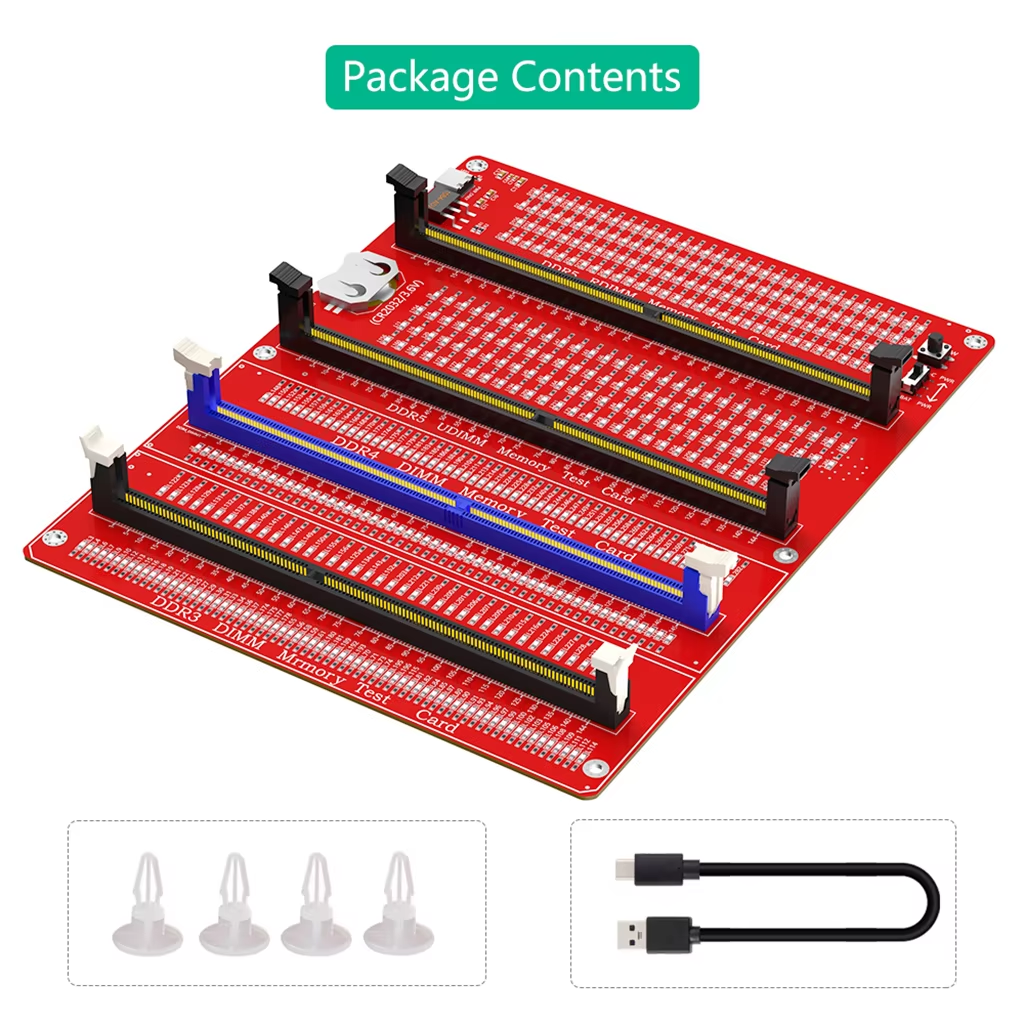
Test DDR3, DDR4, and DDR5 UDIMM and RDIMM desktop memory kits easily using LED indicators to ensure proper connectivity and hardware status.
8 in stock
Designed to test desktop PC DDR3, DDR4, and DDR5 memory modules, this single tool supports both UDIMM and RDIMM types, covering multiple current standards.
Its 3-in-1 function simplifies diagnosing memory modules across these formats without needing separate testers.
The integrated LED indicators test all data lines on the memory module for faults.
Normal LED brightness means proper connectivity; any abnormal brightness or lack of light reveals hardware issues such as poor contact, open or short circuits.
Memory failures often result from damaged gold pins, broken PCBs, or disrupted data lines.
This tester helps detect these issues early by signalling poor contacts (flashing LEDs) or open circuit failures (no LED).
Power the tester via a CR2032 battery or the included Type C cable, then insert the memory module to initiate testing.
Color of card slots varies as dispatched at random, but functionality remains consistent.
It supports DDR3, DDR4, and DDR5 UDIMM and RDIMM desktop memory modules.
LEDs light at normal brightness if data lines are normal; abnormal brightness or no light indicates hardware faults.
A flashing indicator signals poor contact of the gold pins on the memory module.
No indicator light means there may be an open circuit failure or damaged PCB or pins on the memory.
You can power it by inserting a CR2032 battery or connecting it via the included Type C cable.
No, it is designed specifically for desktop PC DDR3/4/5 memory modules.
It detects issues such as poor pin contact, open or short circuits, and damage to data lines by LED indication.
No additional tools are required; simply insert the memory module into the tester and power it.
The package includes the memory tester card, a Type C cable, and four PCB spacers.
No assembly is needed; it is ready to use out of the box.
Very good
Arrived on time, very good device for testing memory modules.
I had my doubts, but it worked without any problems. I had memories that I thought were damaged, and this cleared up that doubt for me. I recommend it.
It arrived in perfect condition, well packaged and working properly. I'm waiting to see how it performs, but I recommend the store.
First, when I plugged in the DDR4 RAM and powered it on, one LED did not light up, so I checked the resistor soldering closely. After soldering one 2k 1005 size resistor, the RAM was working normally. Due to the nature of PCBs with many resistor LEDs, cold soldering inspection is necessary. Please take note of this.