
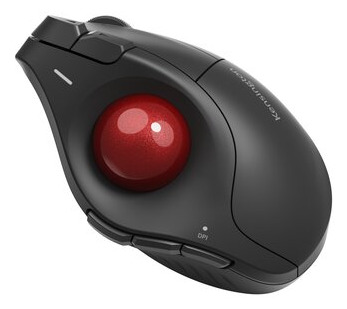
Kensington Pro Fit Ergo TB675 Vertical Wireless Trackball Mouse
$59.99
Pay now, in 4 interest-free payments of $15.00, or over 3–6 months
4 interest-free payments of $15.00
Ergonomic 60° vertical wireless trackball mouse with triple connectivity, adjustable DPI, 9 programmable buttons, and rechargeable battery for comfortable multi-device use.
46 in stock
↗
Estimated Delivery Time22 - 23 Nov 26
Ergonomic Vertical Comfort
Designed for professionals who spend hours navigating spreadsheets and creative tools, the Pro Fit Ergo TB675 features an ergonomist-approved 60° vertical tilt and contoured shape. This supports a natural wrist and thumb position, reducing strain and promoting comfort during long work sessions.
Flexible Multi-Device Connectivity
Connect up to four devices using three options: a secure 2.4 GHz wireless dongle with 128-bit AES encryption, dual Bluetooth, or a wired USB-C connection. A built-in device selector simplifies switching between devices for seamless productivity.
- 2.4 GHz wireless with encryption
- Dual Bluetooth pairing
- Wired USB-C option
- Easy multi-device switching
Precision and Control Features
The mouse includes a high-precision optical sensor paired with a 34mm thumb trackball, delivering smooth cursor control. Instantly toggle between four DPI settings (400 to 1600) to adjust pointer speed for detailed or fast work. Navigate documents easily with a durable metal 4D scroll wheel supporting vertical and side scrolling.
- Adjustable DPI: 400–1600
- Durable metal 4D scroll wheel
- 34 mm thumb-operated trackball
Customizable Workflow Buttons
Nine programmable buttons enable efficient navigation and commands. Using Kensington Konnect™ software, customize buttons and assign shortcuts or macros to fit your workflow needs, including two default-assignable side buttons.
Long-Lasting Rechargeable Battery
A high capacity rechargeable battery offers up to four months of use per charge. LED indicators provide battery status updates, and the USB-C cable allows quick recharging with continued use during charging for uninterrupted workflow.
Easy Maintenance and Durable Build
The patented quick release button allows fast removal of the trackball for cleaning, preventing dust accumulation and maintaining consistent performance over time. The premium build quality ensures durability for everyday professional use.
Key specifications
- Connectivity: 2.4GHz wireless, Dual Bluetooth, USB-C wired
- Ergonomic Design: 60° vertical tilt for right hand
- DPI Settings: 400, 800, 1200, 1600
- Programmable Buttons: 9
- Scroll Wheel: Metal 4D scroll wheel
- Trackball Diameter: 34 mm
- Battery Type: Rechargeable battery (up to 4 months per charge)
- Operating Systems: Windows, MacOS
- Security: 128-bit AES encryption (wireless)
- Power Source: Built-in rechargeable battery
What's in the box
- Kensington Pro Fit Ergo TB675 Mouse
- USB-C Recharge Cable
- 2.4GHz Wireless Dongle
- User Guide
Product FAQ
Frequently asked questions
01 What is the ergonomic design of the Kensington Pro Fit Ergo TB675?
It features an ergonomist-approved 60° vertical tilt with a contoured shape to support natural wrist and thumb positioning, designed for average-sized right hands.
02 How does the connectivity work on this mouse?
The TB675 connects via 2.4GHz wireless dongle with 128-bit AES encryption, dual Bluetooth, and wired USB-C connection, allowing up to four devices to be paired and switched seamlessly.
03 What is the battery life of the rechargeable battery?
The rechargeable battery can last up to four months on a single charge, with LED indicators showing battery status and use possible while charging.
04 Can the DPI be adjusted on this mouse?
Yes, there are four DPI settings (400–1600) that can be switched instantly to tailor pointer speed for detailed or fast navigation.
05 How many programmable buttons are available?
There are nine programmable buttons that can be customized using Kensington Konnect™ software, including two default-assignable side buttons.
06 What type of scroll wheel does the mouse have?
It includes a premium metal 4D scroll wheel that supports smooth vertical scrolling and side-to-side navigation with a tilt function.
07 Is the trackball easy to clean?
Yes, a patented quick release button lets you easily pop out the trackball for cleaning to maintain smooth tracking and performance.
08 What operating systems does the mouse support?
It supports Windows and Mac operating systems.
09 What sensor technology is used?
This mouse uses a high-precision optical sensor paired with a 34mm thumb-operated trackball for smooth and accurate cursor control.
10 Is the mouse suitable for left-handed users?
No, the design is specifically optimized for right-hand use.
Discussion
0.0
Based on 0 reviews
No reviews yet. Be the first to share your experience.